Operate SpearX
CPU and concurrency configuration
Control scan CPU, threads, timeouts, archives, and production-safe execution.
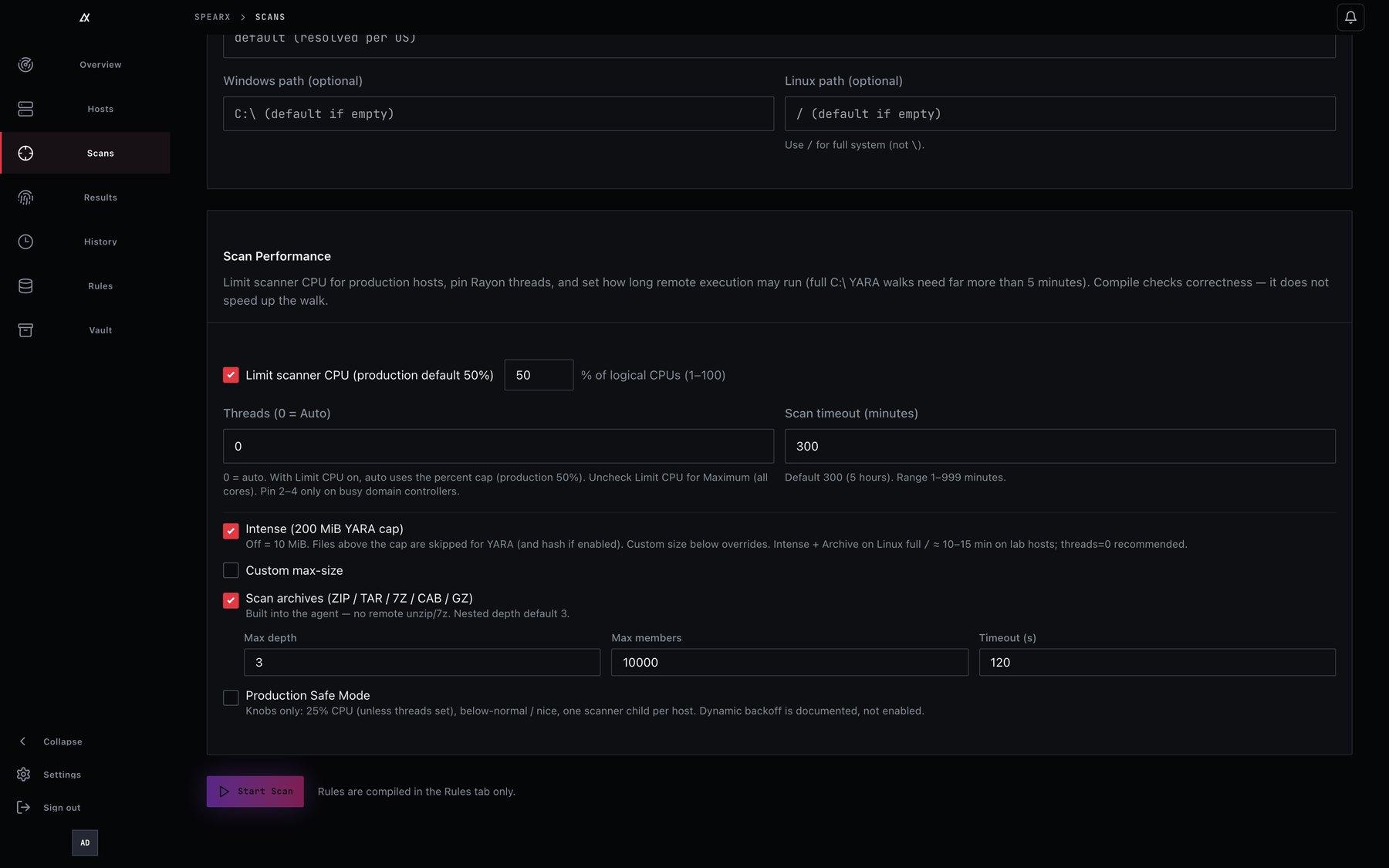
Performance controls limit the work performed on each remote target. They do not guarantee a completion time.
Verified controls
| Setting | Interface behavior | Starting guidance |
|---|---|---|
| Limit scanner CPU | Caps CPU as a percentage of logical CPUs | Keep enabled for production targets; the interface displays 50% as the production default |
| Threads | 0 uses automatic selection | Leave at 0 unless testing shows a need; the interface recommends 2-4 for busy domain controllers |
| Scan timeout | 1-999 minutes | The interface displays 300 minutes; narrow scans may need less, full-disk scans may need more |
| Intense mode | Raises the standard 10 MiB per-file YARA cap to 200 MiB | Enable only when large files are in scope |
| Custom maximum size | Overrides the displayed YARA size cap | Document the reason and storage impact |
| Archive scanning | ZIP, TAR, 7Z, CAB, and GZ | Limit recursion depth, members, and timeout |
| Production Safe Mode | Applies conservative process controls shown in the current UI | Use for sensitive systems after validation |
Safe tuning method
- Establish a baseline on one representative non-production host.
- Record target size, rule count, archive settings, CPU cap, threads, timeout, duration, and result count.
- Change one control at a time.
- Monitor endpoint CPU, memory, disk I/O, network, and service health.
- Repeat with the production-safe profile before wider rollout.
- Keep rollback and abort procedures ready.
Do not copy demonstration durations into a capacity plan. Workload, storage, rule complexity, host health, network latency, and archive content can change scan duration substantially.