Detection rules
YARA and YARA-X rules
Create, import, validate, select, and govern YARA detection content.
SpearX supports YARA and YARA-X detection rules. Rule Control is the registry for detection logic; use the YARA filter to browse packs, platforms, tags, validation state, compiled identifiers, and source.
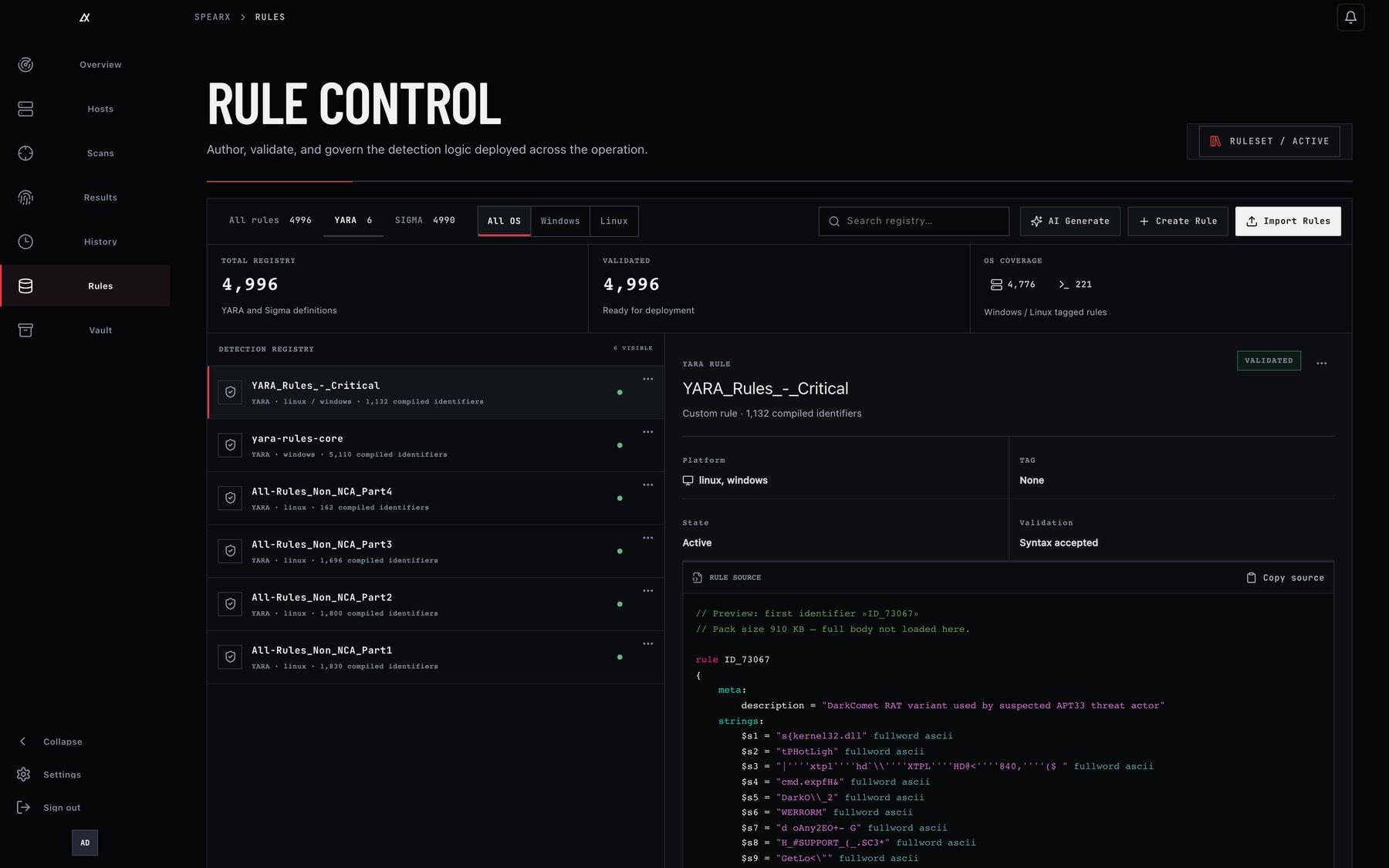
Add YARA content
- Create Rule opens the rule editor for a name, source, tags, and target OS.
- Import Rules accepts
.yar,.yara, and supported ZIP rule packages. - AI Generate can draft a rule when an AI provider is configured, but generated content still requires human validation.
Rule-review checklist
- Confirm the source and license permit operational use.
- Review metadata, strings, modifiers, and condition logic.
- Check for overly broad strings and expensive conditions.
- Validate syntax in Rule Control.
- Test against known-positive and known-negative samples.
- Limit the first scan to a controlled path and host.
- Record the rule owner, revision, and validation evidence.
YARA and YARA-X aim for broad rule compatibility, but engine behavior can differ. Validate each rule pack with the engine selected for production and review any compilation or behavior differences before deployment.
Example workflow
Import a reviewed .yar file, confirm that the rule shows Validated, select one test host and a narrow directory, run the scan, and compare the returned matched strings with the expected sample.